Usage
This guide explains how to configure, define, and execute end-to-end tests for dbt models using pytest-dbt-duckdb.
- Define test scenarios in YAML
- Configure dbt with profiles.yml
- Run tests locally using DuckDB
- Integrate tests seamlessly into CI/CD pipelines
️ Project Configuration
Installation
Step 1: Install package
Install the package using pip:
pip install pytest-dbt-duckdb
Step 2: Create profiles.yml
Configure dbt to use DuckDB as the testing engine by adding this to your profiles.yml file:
pytest:
  target: duckdb
  outputs:
    duckdb:
      type: duckdb
      path: "{{ env_var('DBT_DUCKDB_PATH') }}"
      database: "{{ env_var('DBT_DUCKDB_DATABASE') }}"
      schema: "dbt_pytest_gummy"
Step 3: Define Environment Variables
In order for dbt to work correctly, set the required environment variables in pytest.ini:
[tool.pytest.ini_options]
minversion = "7.0"
addopts = "-p no:warnings"
testpaths = ["tests"]
env = [
    "DBT_RAW_DATABASE = pyduck",
    "DBT_DATABASE_NAME = pyduck",
    "DBT_PROFILE = pytest"
]
Writing a Test Scenario
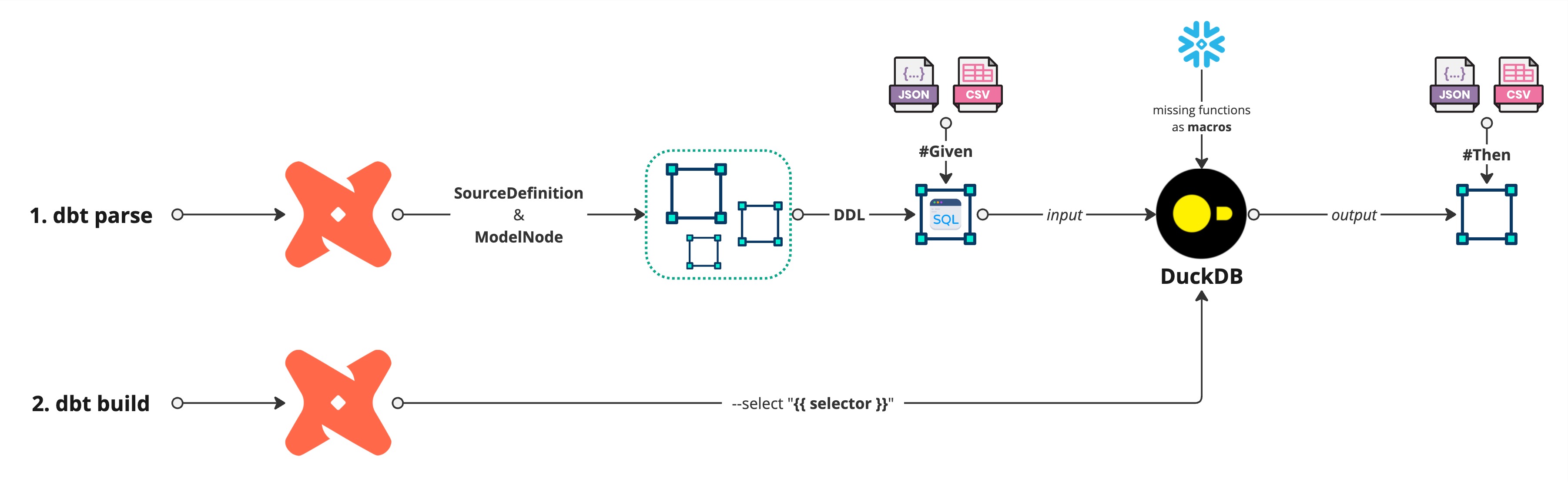
Structure of a YAML Test
Each test follows this structure:
id: test unique identifier.given: Input datasets (CSV/JSON files) to load.seed: dbt seeds to be executed.build: dbt models to be executed.then: Expected outputs after transformation.
Test Case Example
tests:
  - id: Validate full project
    given:
      - schema: netflix
        table: shows
        path: 'e2e/given/netflix_titles.csv'
    seed: seed_show_ratings
    build: '+int_show+'
    then:
      - schema: 'dbt_pytest_gummy'
        table: 'fct_director'
        path: 'e2e/then/fct_director.csv'
      - schema: 'dbt_pytest_gummy'
        table: 'fct_cast'
        path: 'e2e/then/fct_cast.csv'
Running the Tests
import pytest
from pytest_dbt_duckdb.plugin import DuckFixture, TestFixture, load_yaml_tests

yaml_data = list(load_yaml_tests("tests/data"))

@pytest.mark.parametrize("fixture", yaml_data, ids=[x.id for x in yaml_data])
def test_dbt_scenarios(fixture: TestFixture, duckdb_fixture: DuckFixture):
    duckdb_fixture.execute_dbt(
        nodes_to_load=fixture.given,
        seed=fixture.seed,
        build=fixture.build,
        nodes_to_validate=fixture.then,
        resources_folder="tests/data",
        dbt_project_dir=".",
    )
️ Hard Requirement: Defining dbt Data Types
Mandatory: Define Column Data Types
For pytest-dbt-duckdb to function correctly, all models in the given and then sections must have explicitly defined dbt column data types.
Why is this Required?
Since the framework recreates models inside DuckDB, it needs accurate data type definitions to:
- Ensure proper table creation in DuckDB
- Prevent type mismatches between expected vs. actual results
- Avoid errors when populating test data
How to Define Column Types in dbt Ensure that every model in given and then is properly defined in your dbt project under schema.yml:
version: 2
models:
  - name: stg_show_rating
    description: Map file with Rating System age & audiences
    columns:
      - name: rating_id
        description: Unique Rating Identifier
        data_type: text
        data_test:
          - not_null
          - unique
      - name: rating_name
        description: Readable Rating name
        data_type: text
      - name: only_adults
        description: Flag to indicate if the show aims to be watched by only adults
        data_type: boolean
      - name: min_age
        description: Suitable for people over this age
        data_type: integer
        data_tests:
          - dbt_utils.accepted_range:
              min_value: 2
              max_value: 18
              inclusive: true
What Happens if You Skip This?
- If column types are not defined, the framework cannot recreate and populate the test models inside DuckDB.
- This will result in test failures due to schema mismatches and incorrectly inferred types.
Solution: Always define your dbt column types properly to ensure reliable testing.
Running with Custom DuckDB Functions
Extending DuckDB with Custom Functions
If you need to extend the DuckDB engine with additional functionality, you can define custom functions:
from pytest_dbt_duckdb.connector import DuckFunction, ExtraFunctions

extra_functions = ExtraFunctions(
    functions=[
        DuckFunction(name="tokenize", function=tokenize, parameters=[str], return_type=list[str]),
        DuckFunction(name="edit_distance", function=edit_distance, parameters=[str, str, int], return_type=int),
    ]
)
Pass extra_functions to execute_dbt when running tests.
Explore Testing Examples
Want to see pytest-dbt-duckdb in action? Check out our real test scenarios in the GitHub repository: GitHub Repository - Testing Examples
These examples include:
- Predefined YAML test cases
- Sample dbt projects
- Fully configured pytest setup
Use them as a starting point for writing your own end-to-end dbt model tests!
Running tests in parallel
Use pytest-xdist for fan-out
The plugin keeps a single DuckDB file per xdist worker (stable DBT_DUCKDB_PATH),
resets state between tests by dropping user schemas, and caches the parsed dbt
Manifest per worker so every dbt build/dbt seed after the first skips the
parse step. Tune the worker count to your CI's CPU count — -n 4 on a 4-vCPU
runner usually beats -n auto, since oversubscription costs more than it saves.
pip install "pytest-dbt-duckdb[parallel]"   # pulls in pytest-xdist
pytest -n 4                                 # match your runner's vCPU count
How isolation is split:
- Per test — DuckDB content (every non-system schema is dropped between tests).
- Per xdist worker — DuckDB file path, dbt
target/andlogs/, in-memory parsedManifest(_MANIFEST_CACHE) and column metadata (_PARSE_CACHE).
Tradeoff: the first test on each worker pays a cold parse. Every subsequent test
in that worker reuses the cached manifest. Round-robin scheduling (pytest -n N
without --dist loadfile) gives every worker exactly one cold parse no matter how
many tests it runs.
:material-stopwatch: Profiling slow tests
Find out where each test's seconds are going
When tests get slow in CI, run with --duckdb-profile to get a breakdown of
where the time is spent — per stage, per test, per worker.
pytest --duckdb-profile               # serial
pytest --duckdb-profile -n auto       # xdist; one table per worker plus an aggregate
The profiler is opt-in. With the flag off, instrumentation is a no-op and adds no measurable overhead.
Stages reported:
load_given— populating DuckDB source tables from CSV/JSON fixtures.dbt_seed—dbt seed --select <selector>.dbt_build—dbt build --select <selector>.validate_then— fetching outputs andassert_frame_equalagainst expected fixtures.dbt_invoke:<command>— wall time of each individualdbtRunner.invokecall (sub-stage; counted insidedbt_seed/dbt_build/ parse).parse_project:hit/parse_project:miss— in-memory manifest cache hits and misses. If you see many misses, yourextra_varsare probably differing across tests.
The total column in the per-test table sums only the four primary stages, so it
reflects the wall time inside DbtValidator.validate (sub-stages aren't double-counted).
Behavioural changes in 0.1.19
DuckConnectorno longer auto-closes its connection. The destructor (__del__) was closing the underlying DuckDB connection at unpredictable garbage-collection times, which became unsafe once the fixture started reusing connections across tests. If you instantiateDuckConnectordirectly (rather than going through theduckdb_fixture), you now own the connection lifecycle — close it yourself or use thewithcontext manager (__enter__/__exit__still close on exit).- DuckDB file path is now per-worker, not per-test. State isolation between tests
comes from dropping every non-system schema; the file (and its registered UDFs and
partial_parse.msgpack) survives across tests in the same worker, which is what enables the parse-skipping speedup. - Consumer-supplied
extra_functions.macrosare now wrapped toCREATE OR REPLACE MACROautomatically before execution. Already-idempotent forms (CREATE OR REPLACE MACRO,CREATE MACRO IF NOT EXISTS) pass through unchanged.
Passing Extra dbt CLI Flags (extra_args)
Forward arbitrary flags to dbt build / dbt seed
Use extra_args to pass any dbt CLI flag that is not otherwise exposed by the
fixture — for example, microbatch date windows with --event-time-start /
--event-time-end.
Option A — per-scenario in YAML:
tests:
  - id: Validate microbatch window
    given:
      - schema: events
        table: raw_events
        path: 'e2e/given/raw_events.csv'
    build: stg_cdc_events
    extra_args:
      - "--event-time-start"
      - "2025-10-10"
      - "--event-time-end"
      - "2025-10-11"
    then:
      - schema: dbt_pytest_gummy
        table: stg_cdc_events
        path: 'e2e/then/stg_cdc_events.csv'
Option B — per-call in Python:
duckdb_fixture.execute_dbt(
    nodes_to_load=fixture.given,
    build=fixture.build,
    nodes_to_validate=fixture.then,
    resources_folder="tests/data",
    dbt_project_dir=".",
    extra_args=["--event-time-start", "2025-10-10", "--event-time-end", "2025-10-11"],
)
The flags are appended verbatim after --select <selector> in every dbt build
and dbt seed invocation. When extra_args is omitted or None, behaviour is
identical to previous versions.
Summary
- Define input data (given), models to build (build), and expected outputs (then).
- Configure dbt using profiles.yml and environment variables.
- Run tests locally with DuckDB for fast execution.
- Integrate tests with CI/CD pipelines to prevent regressions.
- Extend with custom DuckDB functions for advanced testing.